Listen · Learn · Plan · Loop

Turn scattered conversations into undeniable direction

Sweep across 16 channels or aim at a single question. Lysnd clusters noisy feedback into clear opportunities, attaches dated public evidence, and loops back after you ship.

THREE WAYS TO LISTEN

Capture everything, aim at one question, or track a release

Start a run however you're thinking. A broad sweep needs nothing but your product — we listen across all 16 channels and every product area, weight them equally, and surface whatever is loudest. A pointed search takes the question you're already chasing and shapes the whole run around it. Track a release goes straight to a listening loop for something you've already shipped.

  • Broad sweep: two steps, no question required — ideal for a first run or a regular check-in
  • Pointed search: four steps — your question, your product, and the focus area it belongs to
  • Track a release: name what you shipped, get a Day 1 baseline, then automatic re-checks (4 credits to set up)
  • All three use the same sources and evidence trail

New search

How do you want to start?

Ask a specific question
2 credits

4 steps · question, product, focus area

Broad sweep of my product
3 credits

2 steps · just confirm the product

Track a release
4 credits

Product, shipped update, and schedule

Listening

Sweep 16 channels in a few clicks

Lysnd.io fans a single sweep or research question across all 16 channels — Reddit, X / Twitter, Hacker News, Product Hunt, G2, Capterra & GetApp, Trustpilot, Quora, Stack Overflow, GitHub Issues, community forums, YouTube, the App Store, Google Play, Steam and the open web — then de-duplicates what comes back so you read each signal once.

  • Query expansion tuned to your product and audience
  • Search anchored to your product identity, not the category
  • Results de-duplicated and scored for relevance

Research in progress

Listening for Lysnd.io

We're gathering signals across 16 channels, scoring relevance and clustering into buildable opportunities.

Sources we'll scan

Live channel scan
  • ◐
    Reddit
    scanning…
  • ·
    X / Twitter
    real-time velocity
  • ·
    Hacker News
    technical & founder takes
  • ·
    Product Hunt
    launch reactions & alts
  • ·
    G2
    verified software reviews
  • ·
    Capterra & GetApp
    buyer software reviews
  • ·
    Trustpilot
    consumer sentiment
  • ·
    Quora
    questions & first-hand answers
  • ·
    Stack Overflow
    technical friction
  • ·
    GitHub Issues
    bugs & feature requests
  • ·
    Community forums
    Discourse discussions
  • ·
    YouTube
    comments & replies on videos
  • ·
    The open web
    blogs, forums, articles
  • ·
    App Store
    first-party app reviews
  • ·
    Google Play
    Android app reviews
  • ·
    Steam
    player reviews
  1. ◐
    Capture chatterrunning…
    Pulling raw signals from selected sources
  2. 2
    Filter & score
    Removing noise, scoring relevance & demand
  3. 3
    Generate opportunities
    Clustering signals into buildable themes

Illustrative example only. The channel counts shown above are fictional and were created for demonstration purposes.

Learning

Opportunities instead of a wall of posts

Raw chatter is clustered into a short list of learnings and opportunities, each with a summary, and volume of evidence behind it. Card titles are always visible; unlock a card to read the details.

  • Summary per opportunity
  • Evidence count and per-source breakdown
  • Source links kept on every card
Feature requestGolden opportunity
9 signals

Connect research directly to product roadmaps

Teams want discoveries to move into the tools where planning already happens, without copying context or losing the supporting evidence.

RedditProduct HuntG2
2 credits to unlockView opportunity
Unmet needGolden opportunity
7 signals

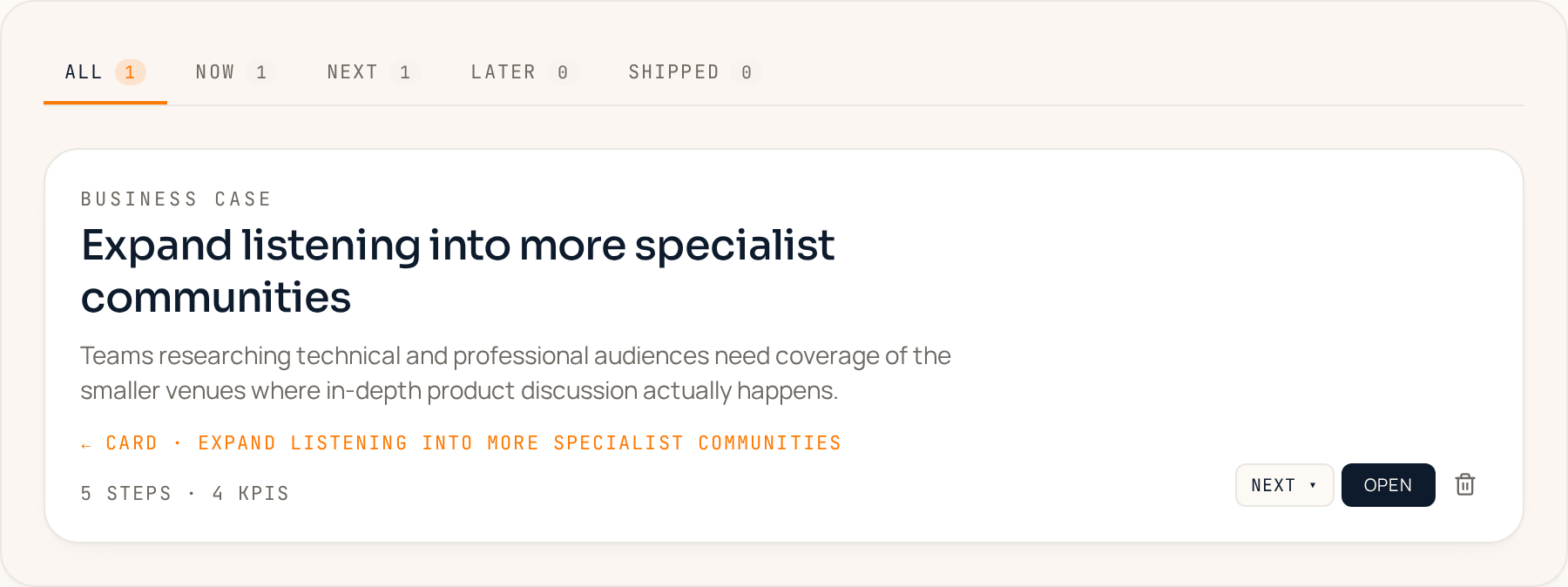
Expand listening into more specialist communities

Product teams need broader coverage of niche forums and professional communities to find valuable conversations competitors miss.

Hacker NewsForumsOpen web
2 credits to unlockView opportunity

Planning

Now / Next / Later, with the why attached

Promote any theme into a lane to act on now or plan for later. The plan carries the original chatter along with it, so anyone can check why an item exists months later.

  • One-click promotion from opportunity card to plan item
  • Four lanes: Now, Next, Later, Shipped
  • Evidence stays linked to each item
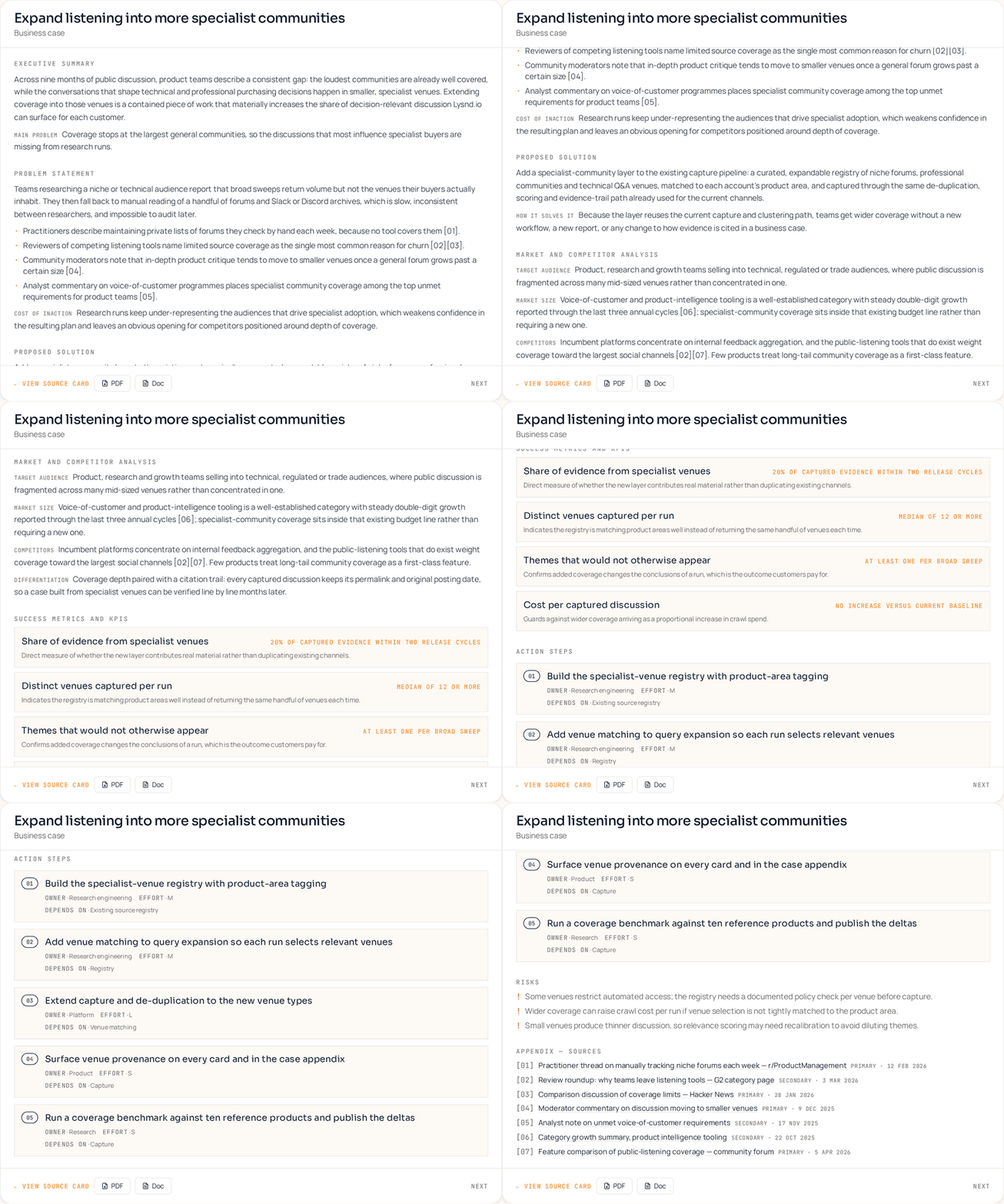
A business case in the Lysnd.io Plan board: the promoted opportunity 'Expand listening into more specialist communities', with its lane selector, step and KPI counts, and a link back to the card it came from.Scrolling through an opened Lysnd.io business case: executive summary, problem statement with cited evidence, proposed solution, market and competitor analysis, success metrics, action steps, risks and a source appendix.
Illustrative example only. The business case, evidence, figures and source references shown above are fictional and were created for demonstration purposes. They are not real research output, do not describe any actual product, company or person, and should not be relied on for any decision.

LOOPING

Did it work? Lysnd goes back and checks

Every other tool stops at the plan. When an item moves to Shipped, start a loop in one click — Lysnd re-listens for conversation about the update itself (new, released, updated) on a cadence you choose, and tells you whether the chatter changed, with dated, cited evidence.

  • Daily, weekly, or monthly checks scoped to talk about the shipped update, not general chatter
  • A plain outcome on every check: praise captured, no change, or new opportunity
  • Cards glow and tags stay bold when new findings are waiting — cleared once you've viewed them
  • 2 credits per check, and loops pause automatically if credits run out

Expand listening into more specialist communities

Listening weekly · last checked Sep 23, next Sep 30

New opportunityPraise captured
CheckDailyWeeklyMonthly· 2 credits per check, so daily costs the most

Fictional example — the glowing border and bold tags mean new findings are waiting. Real watches cite dated, linked evidence.

COLLABORATING

Shared accounts with clear roles

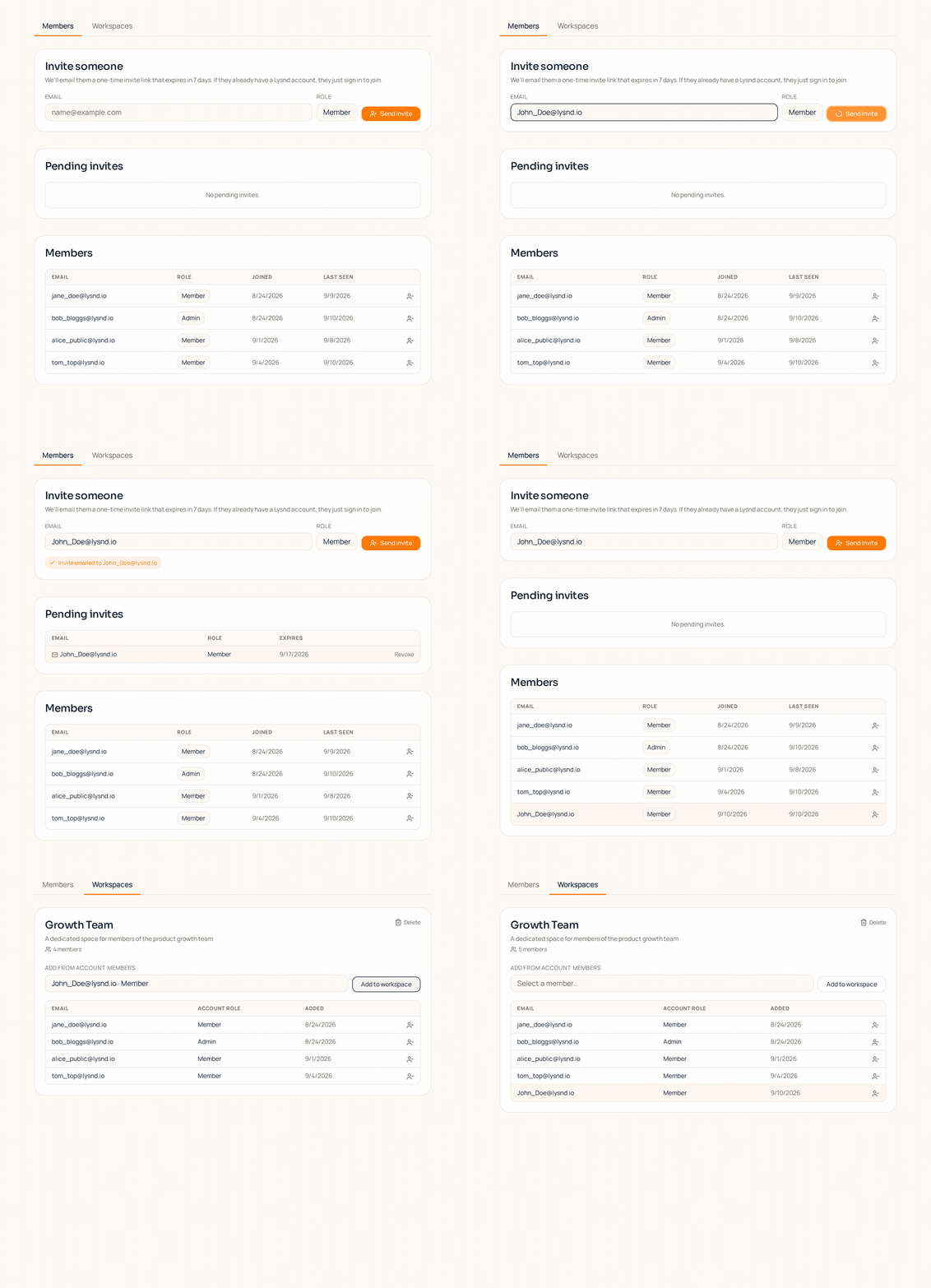
Invite teammates into your account as admins or members. Projects, credits and plans are shared at the account level, so research does not get siloed in one person's login.

  • Admin and member roles with dedicated workspaces
  • Shared credit balance visible to all account members
  • Unlimited users on an account
Inviting a teammate in Lysnd.io: an email invite is sent from the Members tab, the pending invite becomes an accepted member set to the Member role, and that person is then added to the Growth Team workspace.
Illustrative example only. The names, email addresses, workspace and dates shown above are fictional and were created for demonstration purposes. They do not represent real people, accounts or customer data.

Want to see it on your own product?

View pricing